How noise removal works: noise prints, AI and voice regeneration
Noise removal splits a recording into many narrow frequency bands, from low hum to high hiss, works out moment by moment how much of each band is noise, and turns those parts down so the voice stands out. Older tools learn the noise from a few seconds without speech, AI models learn what voices and noise sound like from thousands of hours of examples and do it on their own, and restoration models go further and rebuild the voice itself.
Last updated · By Routes Software, the makers of Denoise
A recording is many frequencies at once
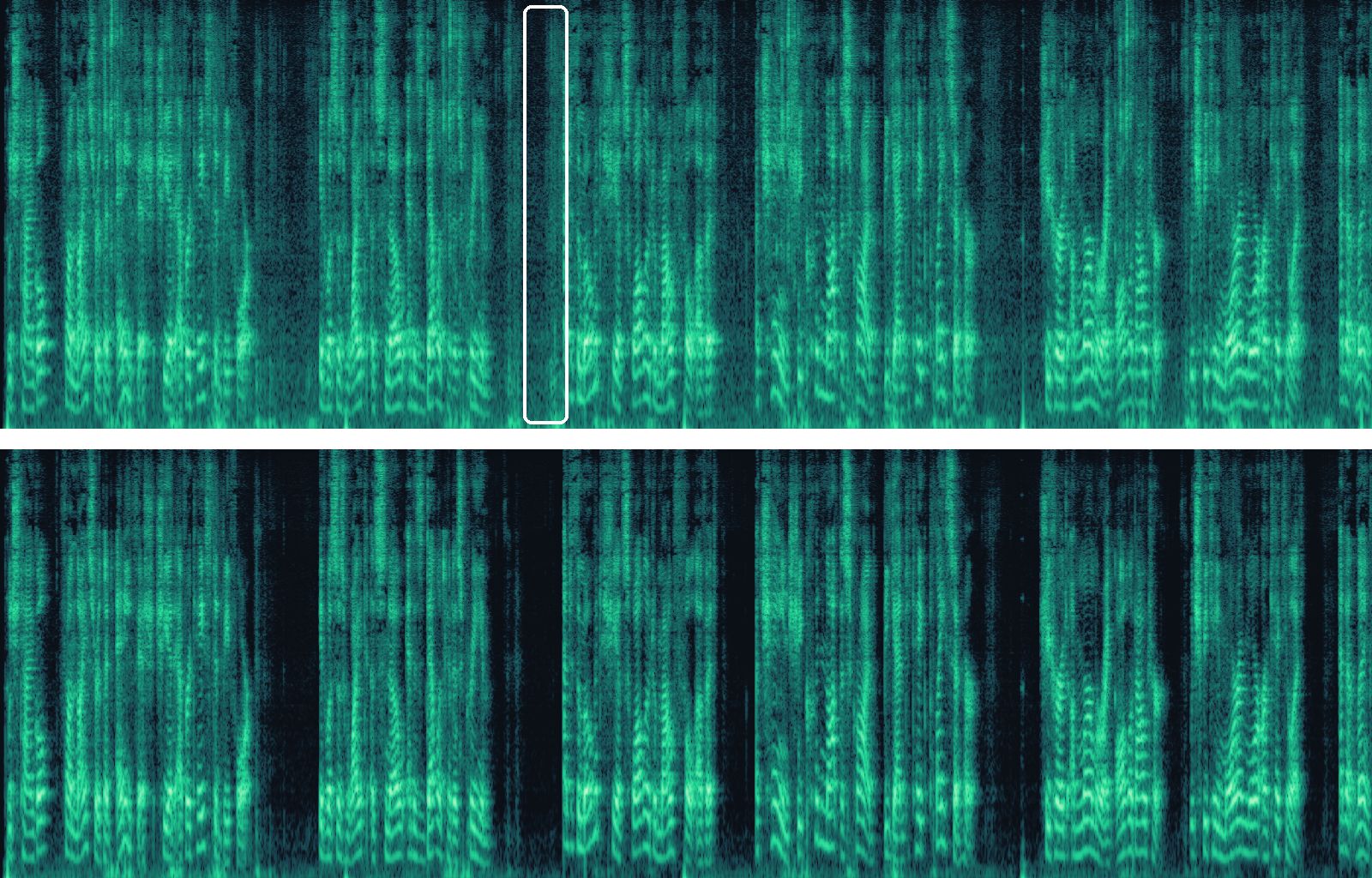
Every sound is a mix of frequencies. A hum is a low tone, hiss is a spread of high ones, and a voice is a set of tones that changes with every syllable. Draw a recording with time running from left to right and pitch rising from bottom to top, and speech shows up as bright stripes, while steady noise is a haze behind them.
1. The noise print: learn the noise, then remove it everywhere
The classic method needs one thing from you: a few seconds with no speech, only the noise. In Denoise that is the Classical engine, which asks you to mark such a stretch and suggests a few. It measures how loud the noise is in every frequency band there, a noise print, and then turns those bands down by that much across the whole recording. Noise reduction level sets how far.
This works best on noise that never changes: a fan, an air conditioner, electrical hum, tape hiss. It struggles with noise that comes and goes, such as traffic, wind or people talking, because one print can't describe all of it. And because it lowers the same bands everywhere, pushing it hard leaves a watery, warbling sound and thins the voice wherever the voice and the noise share frequencies.
2. AI noise suppression: the same idea, done for you
AI denoisers do the same job without asking for a sample. They were trained on thousands of hours of clean speech mixed with every kind of noise, so they have learned what a voice looks like in that picture and what noise looks like. Every few milliseconds they estimate, band by band, how much of the sound is voice, keep that and turn the rest down. Because they decide again at every moment, they follow noise that changes: a passing car, a gust of wind, a door.
This is what AI · Auto does by default in Denoise, with the DPDFNet and DeepFilterNet models also offered on their own as AI · DPDFNet and AI · Fast Denoise; AI · aTENNuate works on the sound wave itself rather than on frequency bands. All of them work only with the sound that was recorded, so they can't add words nobody said. Denoise strength decides how much noise comes out, and leaving a little often sounds more natural.
3. Restoration: rebuilding what the recording lost
Some recordings have lost part of the voice, not just gained noise. A phone call, an old voice recorder or heavy compression can cut off the higher frequencies, so a voice sounds muffled even in a quiet room. Restore speech quality rebuilds that missing upper part from what is left. It adds to the voice rather than replacing it, so the words stay the ones that were said; what it adds is a plausible brightness, not the detail that was lost.
4. Regeneration: a new voice from a description of the old one
The newest restoration models go further. They listen to the damaged recording, work out the speech they believe is there and generate a fresh recording of it, much as a speech synthesizer would. That is how AI · Sidon can rescue audio a denoiser can't: badly distorted, clipped or very muffled voices.
The catch is that the result is the model's best guess. When too much of the original is missing, a regenerating model can produce speech that sounds right, with the right voice and rhythm, but says syllables nobody said, sometimes outright nonsense. We heard exactly that from VoiceFixer, the model Denoise used before, on a badly damaged lecture: clear-sounding speech that made no sense. Sidon, which replaced it, was built and tested to keep the words, but no regenerating model is immune, so check names and numbers in anything that matters, and use regeneration only when ordinary noise removal can't help.
What decides how good the result can be
Every method above can only work with what the recording still holds. Four things matter most:
- How much of the voice survived. If part of the voice was never recorded, or was thrown away by a low-quality format, noise removal can't bring it back; only restoration can add a plausible version.
- How loud the noise is compared with the voice. When the noise is as loud as the voice or louder, the two share most frequencies, and taking the noise out takes parts of the voice with it: the result sounds thin, muffled or robotic.
- Whether the recording was clipped. If the sound was too loud for the microphone or the recording level, the peaks of the sound wave were cut flat. That crackly distortion is now part of the voice, not separate noise, so a denoiser leaves it; only regeneration can redraw it.
- What else in the background sounds like a voice. Other people talking, or music with singing, look like speech to every method, so some of it stays. For music, AI · Music separates the vocals from the instruments instead.
Echo is not noise
A room's echo, or reverb, is the voice itself arriving again a moment later from the walls, ceiling and floor. Because it is made of the same sound, it is harder to remove than noise: AI denoisers reduce some of it, but in a hall, a stairwell or an empty room the words blur together, and no setting fully un-blurs them. The fix is distance: the closer the microphone is to the mouth, the louder the voice is compared with its echo.
The best noise removal happens before you record
Software rescues recordings; it can't recover sound that was never captured. A few habits do more than any setting:
- Get the microphone close. A phone held near the speaker beats one on a table across the room. For interviews and videos, a clip-on (lavalier) microphone on the speaker's collar is the biggest single improvement, wired or wireless.
- Keep the wind off it. A foam or furry windscreen on an external microphone helps outdoors; with a phone, turn your back to the wind or shelter the phone with your hand or a corner.
- Watch the level. If the meter hits the top, the sound clips. A little too quiet is safer, because quiet can be raised later and clipping can't be undone.
- Pick the quietest place you can. Turn off fans and air conditioning while you record, and move away from traffic and running machines.
- Soft rooms echo less. Furniture, curtains, carpets and bookshelves soak up echo; tiles, glass and empty rooms bounce it back.
Hear the difference
Frequently asked questions
Does AI noise removal make up words?
Noise suppression models such as AI · Auto, AI · DPDFNet, AI · Fast Denoise and AI · aTENNuate don't: they work only with the sound that was recorded, keeping the voice and lowering the rest. Regeneration models such as AI · Sidon generate new audio and, on a badly damaged recording, can say something that wasn't said, so check the important words after using one.
Why does my voice sound muffled or robotic after noise removal?
Usually because the noise was as loud as the voice, so removing it took parts of the voice too. Try a lower Denoise strength or another engine. If the recording was muffled before any noise removal, turn on Restore speech quality.
Can noise removal fix echo?
Partly. AI denoisers reduce some room echo, but heavy reverb is the voice itself arriving late and can't be fully removed. Recording closer to the speaker is the reliable fix.
Can it fix a distorted or clipped recording?
Noise removal can't, because clipping changes the voice itself rather than adding noise. Regeneration, AI · Sidon in Denoise, can redraw clipped speech, with the risk of invented sounds described above. To avoid clipping, record a little quieter.
Which engine should I start with?
Start with AI · Auto: it picks the model and settings for your recording. Use Classical for a steady hum the AI leaves behind, and AI · Sidon for voices that are distorted or badly damaged rather than just noisy.
Is it better to remove noise afterwards or to record cleanly?
Record as cleanly as you can: noise removal rescues recordings, but it can't bring back sound that was never captured. Moving the microphone closer does more than any setting.
Sources
- Suppression of acoustic noise in speech using spectral subtraction (S. Boll, 1979)
- DeepFilterNet (open source)
- DPDFNet: Boosting DeepFilterNet2 via Dual-Path RNN
- aTENNuate: Optimized Real-time Speech Enhancement with Deep SSMs on Raw Audio
- AP-BWE: speech bandwidth extension (open source)
- Sidon: Fast and Robust Open-Source Multilingual Speech Restoration for Large-scale Dataset Cleansing